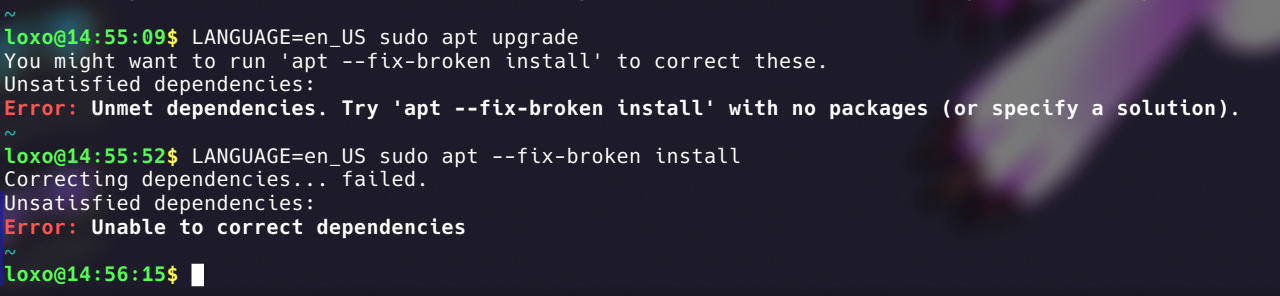
I’ve been trying the COSMIC store and it looks like it killed my apt somehow. Apt says that there is a version mismatch between some libc6 packages, but I checked with dpkg and it all looks correct.
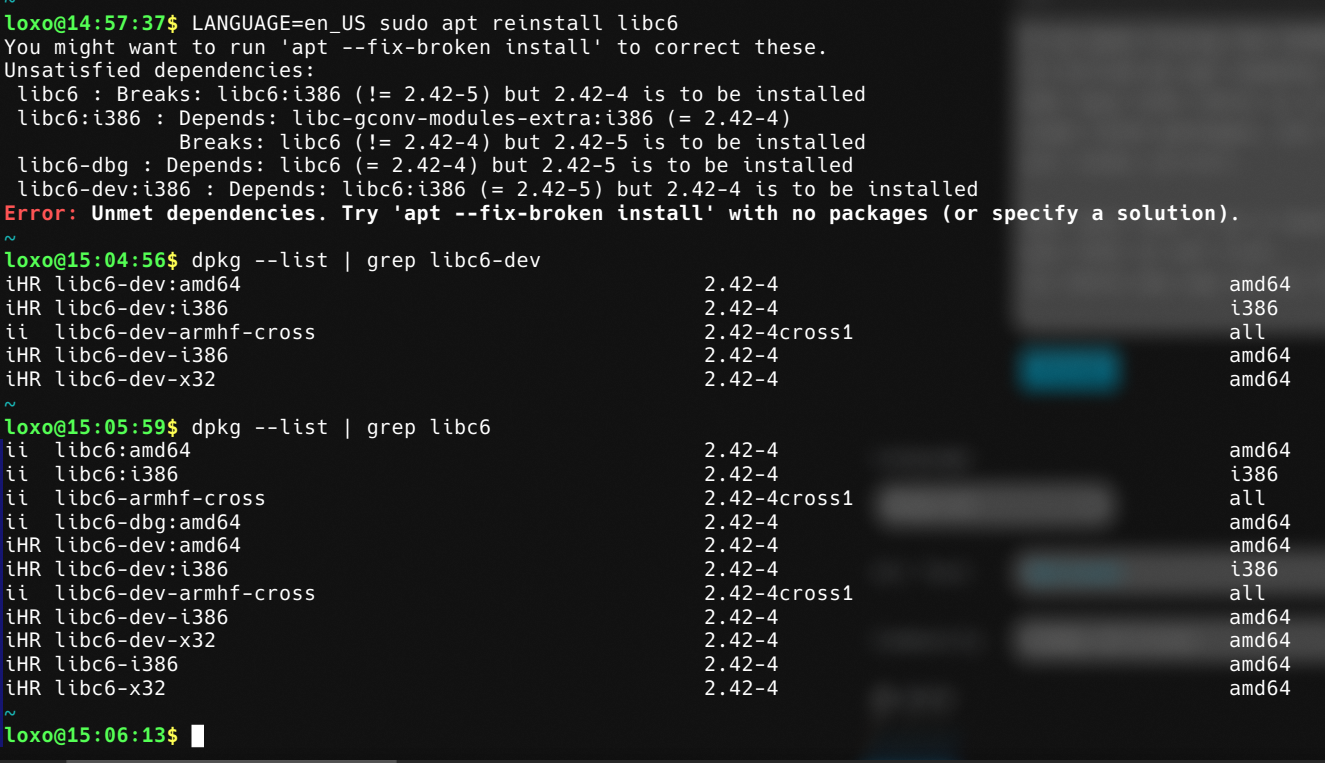
Apt says that I’ve a newer version of some packages but that is not true. Is there any way to fix this?
EDIT: Fixed formatting
Looks more like whatever repo you’re trying out is bugged.
I suggest you install the stable version (since stability and predictability are the main features of Debian). If you need the latest packages go Arch (or any other rolling-release distro).
I’ve been using Debian Unstable for about one year since I wanted Plasma 6 so bad. Even after Trixie came out I didn’t switch back to Stable because it runs good and gets frequent updates.
The experience was actually quite smooth, better than what my friend has with Kubuntu, which for every distro update has a 50% chance of breaking
I once tried to backport a package on Debian stable because I really wanted to run xwayland-satellite on Niri and I ended up breaking the system. I was using stable debian as-is since then, before switching to Arch.
Came here expecting it to be about someone listening to your package installs
Time for “aptitude”
Can also endorse
aptitude, but hopefully OP already has it installed prior to this issue. May have to manually install usingdpkgif not. Whenever I run into issues like this,aptitudesolves it 95% of the time, makes regularaptlook like a baby helplessly crying.That fixed it, thank you so much!
Somehow I can’t even install aptitude trough dpkg because it says that the filesystem is read-only
Sounds like your hard drive may be dying.
No, I just figured it out. I had to enable a systemd service to test Cosmic. I have disabled it and now dpkg works and I manually installed Aptitude with its dependencies.
I tried to do an upgrade with Aptitude but it won’t do anything. I’ll look into it more later
Has it added repos that are conflicting with your distro’s main ones?
Check /etc/apt/sources.list and all the files in /etc/apt/sources.list.d/
Move anything that looks sus to somewhere else and then “apt-get clean” and retry.
Nope. Sources look good. I just removed some I don’t use anymore and then did an
apt-get cleanbut it’s still broken
I gotta ask this:
What’s the output of apt —fix-broken install, like the big red error message suggests?
I also gotta ask:
What distribution and release?
What’s the output of apt —fix-broken install, like the big red error message suggests?
You can see it in the post image. I’m using Debian Unstable
Good looking out. I only saw the one inline with your post body.
You’re on sid, using cosmic and have a read only root filesystem. Is there anything else out of the ordinary with your computer? You replied to another post that you removed additional repos from sources but did you get the ones in sources.d/?
E: sources.list.d, not sources.d
Correction: My filesystem is not read only. Dpkg can install .deb packages just fine
My guess is that I tried to update packages in a specific time that there was a dependency issue in the Debian Unstable repository.
Cosmic actually compiled and installed perfectly and the system still works and runs stable. It is a problem with Apt
Try all the cleanup commands, so:
apt autoremove; apt clean; apt autoclean; apt updateThen reboot and try again.
But yes, it looks weird.
Just did all of them and rebooted. No luck
Okay, I’ve read into your post a bit more and something is fishy. You have libc6 for different CPU-architectures installed.
Programs for i368 and amd64 should not be installed on the same machine. The error probably stems from that.
Run the following to find out the architecture:
uname -pIf it says ‘x86_64’ then it’s amd64 and if it’s something like 'i368’ then it’s that. Otherwise, your system might be really borked…
And then remove the wrong one.
FWIW, installing steam used to also install both architectures on my Fedora machine. I use the flatpak version now because it kept causing conflicts years ago.
My best guess is that the Debian Unstable repository doesn’t have all the libc6 packages updated to the same version. I might just have to wait and see what happens
Looks like that might have changed, libc-gconv-modules-extra has an i386 package for 2.42-5 added at like midnight UTC+1. Given the sources only update every 6 hours, might be you found an unlucky update in between?
Struggled to find a time for the release, but the changelog has one, unsure how true to package-available time that is:
glibc (2.42-5) unstable; urgency=medium

  [ Martin Bagge ]
  * Update Swedish debconf translation.  Closes: #1121991.

  [ Aurelien Jarno ]
  * debian/control.in/main: change libc-gconv-modules-extra to Multi-Arch:
    same as it contains libraries.
  * debian/libc6.symbols.i386, debian/libc6-i386.symbols.{amd64,x32}: force
    the minimum libc6 version to >= 2.42, to ensure GLIBC_ABI_GNU_TLS is
    available, given symbols in .gnu.version_r section are currently not
    handled by dpkg-shlibdeps.

 -- Aurelien Jarno <aurel32@debian.org>  Sat, 06 Dec 2025 23:02:46 +0100

glibc (2.42-4) unstable; urgency=medium

  * Upload to unstable.

 -- Aurelien Jarno <aurel32@debian.org>  Wed, 03 Dec 2025 23:03:48 +0100
did you apt update beforehand ? it is weird that it’s trying to install lower level libc6
I regularly update using a macro in the terminal that just runs
sudo apt update && sudo apt upgradebut this time I decided to install an update via the COSMIC store
Ubuntu ppa in not-Ubuntu?
Nope
What does
dpkg --print-foreign-architecturessay?i386
This is a feature not a bug.